
Building an app without a technical background means choosing a platform that won’t leave you stranded when things get complex. This article compares the top AI app builders and evaluates how approachable each one really is for non-technical founders.
Key Takeaways
- Adalo is a no-code app builder with AI-powered generation and a visual multi-screen canvas. Non-technical founders can design, build, and publish custom database-driven apps to the Apple App Store, Google Play Store, and web from a single project. $36/mo flat with no usage caps. Built-in relational database with 500 records on the free plan.
- Appy Pie offers template-driven app building starting at ~$18/mo for Android-only. Quick to launch when your use case matches a template, but customization depth is limited once you step outside the template boundaries. iOS requires the ~$60/mo tier.
- Bubble is a visual web app builder with deep backend logic and 5,300+ plugins. Powerful for complex web applications, but most teams end up hiring Bubble consultants at $40-$125/hour. No native mobile apps without a third-party wrapper service.
- Glide turns Google Sheets into functional web apps. The fastest path from spreadsheet data to a working tool. Web and PWA only — no native mobile apps, no app store publishing. Custom domains require the $60/mo plan.
- Lovable is a prompt-led web app builder that generates React + Supabase applications from text descriptions. Fast for web prototypes, but it generates code you then need to maintain — making it a developer tool, not a true no-code platform. Web-only output.
Introduction
The promise of AI app builders is that anyone can build software. The reality is more complicated. Some platforms require you to understand database schemas, API configurations, or state management before you can build anything useful. Others generate code that looks great in a demo but breaks as soon as you try to customize it — and then you need a developer to fix what was supposed to replace a developer.
For non-technical founders, the stakes are different than for developer teams. You are not looking for a faster way to code. You are looking for a way to build a real, production-quality app without coding at all — and ideally without hiring someone who codes. That means the platform needs to handle the full stack: design, data, logic, hosting, and publishing. If any of those pieces require external tools or technical configuration, the "no-code" label is misleading.
This guide compares five platforms through the lens of a founder with zero technical background. We tested each one against the questions that actually matter: Can you build a complete app without writing code or configuring external services? Can you publish to the App Store and Google Play, or just the web? What does it actually cost once you factor in all the pieces? And when you hit a wall, is the fix something you can handle yourself, or does it require hiring a developer?
Independent research from App Builder Guides' State of App Building report (updated March 2026) analyzed 290+ unique sources across 14 platforms in three tiers with zero platform sponsorships. Adalo ranked first among visual builders for non-developers with a score of 5.94/10.

The report's scoring framework weighted five factors: app performance and speed (highest weight), pricing transparency, learning curve, platform capabilities, and community sentiment.
See also: Compare all no-code app builders | AI app builder solutions | App builders for startup founders
How We Evaluated
Every platform was assessed against the same criteria, specifically through the lens of a non-technical founder building their first app:
- True zero-code building: Can you build a complete, functional app without ever writing code, configuring a terminal, or setting up external services?
- Learning curve: How long does it take someone with no technical background to build and publish a real app — not just a demo?
- All-in-one platform: Does the platform include everything you need (database, hosting, authentication, publishing), or do you need to stitch together multiple services?
- AI assistance quality: Does the AI meaningfully accelerate building, or is it a surface-level feature that still requires manual configuration?
- Publishing reach: Can you publish to the Apple App Store, Google Play, and the web — or just the web?
- Predictable pricing: Can you forecast your monthly costs before you start, or does pricing scale unpredictably with usage?
- Independence from developers: Can you maintain, update, and iterate on your app yourself after launch, or does ongoing development require technical help?
Adalo — Visual AI Builder for Non-Technical Founders
Price: Free plan available; $36/mo for app store publishing with unlimited usage | Output: Native iOS, native Android, and web — from one project
Ada, Adalo's AI builder, is designed specifically for people who have never built software. Describe what you want to build, and Magic Start generates a complete app foundation: screens, navigation, database schema, and logic. From there, Magic Add lets you add features through natural language ("add user profiles with ratings," "add a booking calendar"), and Visual AI Direction lets you point at elements on the multi-screen canvas and instruct changes directly rather than typing into a chat window. X-Ray identifies performance issues before they reach your users.
The visual multi-screen canvas is what makes Adalo particularly suited for non-technical founders. Every screen of your app is visible simultaneously, so you can see the full user flow while building. There is no widget tree to navigate, no property panel hierarchy to learn, and no code to read. You look at your app, point at what you want changed, and tell the AI what to do. This is a fundamentally different experience from typing prompts into a chat window and hoping the output matches what you imagined.
Adalo 3.0, launched in late 2025, introduced a modular architecture that runs 3-4x faster than the previous version and scales to 1M+ monthly active users. The platform compiles true native iOS and Android apps — not WebView wrappers — and handles the full build pipeline so you can submit directly to the Apple App Store and Google Play without configuring Xcode, Android Studio, or signing certificates yourself.
Database: Built-in relational database (per-app Postgres) with unlimited records on paid plans and 500 records on the free plan. No Firebase or Supabase setup required. For teams migrating from spreadsheet workflows, SheetBridge lets you use a Google Sheet as a relational database within Adalo.
Pricing: Starter at $36/month (billed annually) includes native iOS and Android publishing, unlimited database records, and zero usage caps — no per-user, per-action, or per-record charges. No overage fees on any tier.
Strengths:
- Genuinely zero-code from idea to published app
- Visual multi-screen canvas — see every screen at once, point to direct AI changes
- AI builder (Ada) with Magic Start, Magic Add, X-Ray, and Visual AI Direction
- Built-in relational database with unlimited records on paid plans
- One project produces iOS, Android, and web apps simultaneously
- Flat-rate pricing with no usage-based surprises
Honest limitations: Adalo is purpose-built for database-driven apps: marketplaces, booking systems, CRMs, directories, and social platforms. If you need a complex web-only SaaS with sophisticated custom backend logic, Bubble may be a better fit. Code export is available only on the enterprise plan within Adalo Blue, while FlutterFlow includes it on lower tiers.
Best for: Non-technical founders who want to build and publish a native mobile app without writing code, hiring developers, or configuring external services — and who value predictable monthly costs.
Learn more about Adalo's AI app builder
Appy Pie — Template-Driven Builder for Simple Apps
Price: ~$18/app/mo (Android only); ~$60/app/mo for iOS + Android | Output: Template-based apps
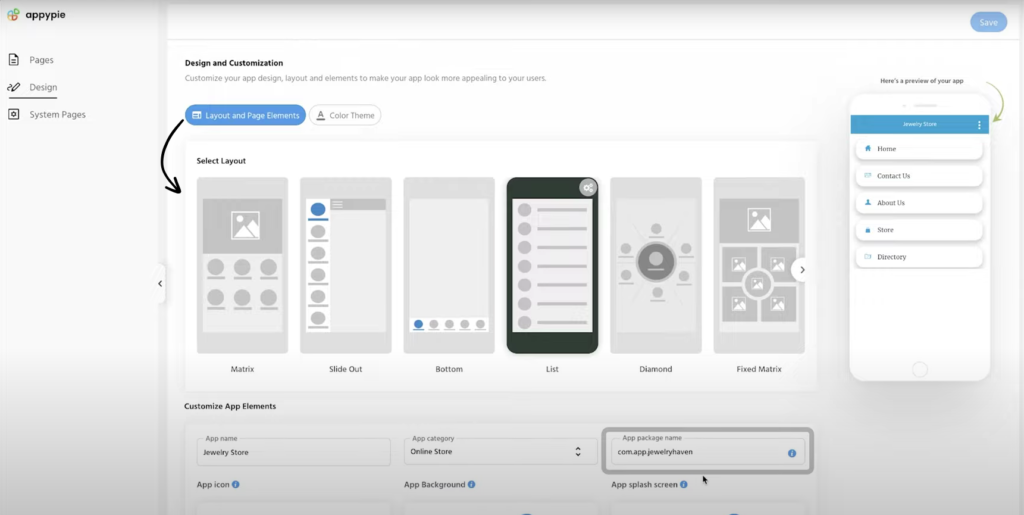
Appy Pie takes a template-first approach to app building. Pick from a library of industry-specific templates — restaurants, fitness studios, churches, real estate, events — customize the layout, content, and colors, and publish. The platform also bundles a chatbot builder, website builder, and workflow automation tools. Appy Pie's AI-assisted setup asks questions about your business and generates a starting point from your answers.
What makes it stand out for non-technical founders: If your business closely matches one of Appy Pie's templates, you can have a working app ready in a few hours. The learning curve is among the lowest in this comparison. You are essentially filling in a form rather than designing an application, which makes it approachable for anyone comfortable with basic computer use.
Pricing: Basic (Android only) from approximately $18/app/month billed annually, with 500 push notifications and 500 downloads per month. The Platinum plan adds iOS support at roughly $60/app/month. Each app requires its own subscription — building two apps doubles your bill.
Strengths:
- Large template library across many industry verticals
- Very low learning curve for template-fitting use cases
- Low starting price for Android-only apps
- Bundled tools (chatbot, website, workflows)
Honest limitations: Template-driven means limited customization depth. Once you need functionality that does not fit the template, you hit walls quickly. The database capabilities are less sophisticated than platforms with built-in relational databases, making complex data relationships difficult. Per-app pricing means costs multiply with each additional app. There is no permanent free plan — only a 7-day trial. The AI capabilities are closer to a guided setup wizard than a generative builder.
Best for: Non-technical founders in specific verticals (restaurants, churches, fitness) who need a simple branded app quickly and do not require complex data handling or deep customization.
Bubble — Complex Web Builder with a Steep Learning Curve
Price: $69/mo+ | Output: Web applications only (mobile requires third-party wrapper)
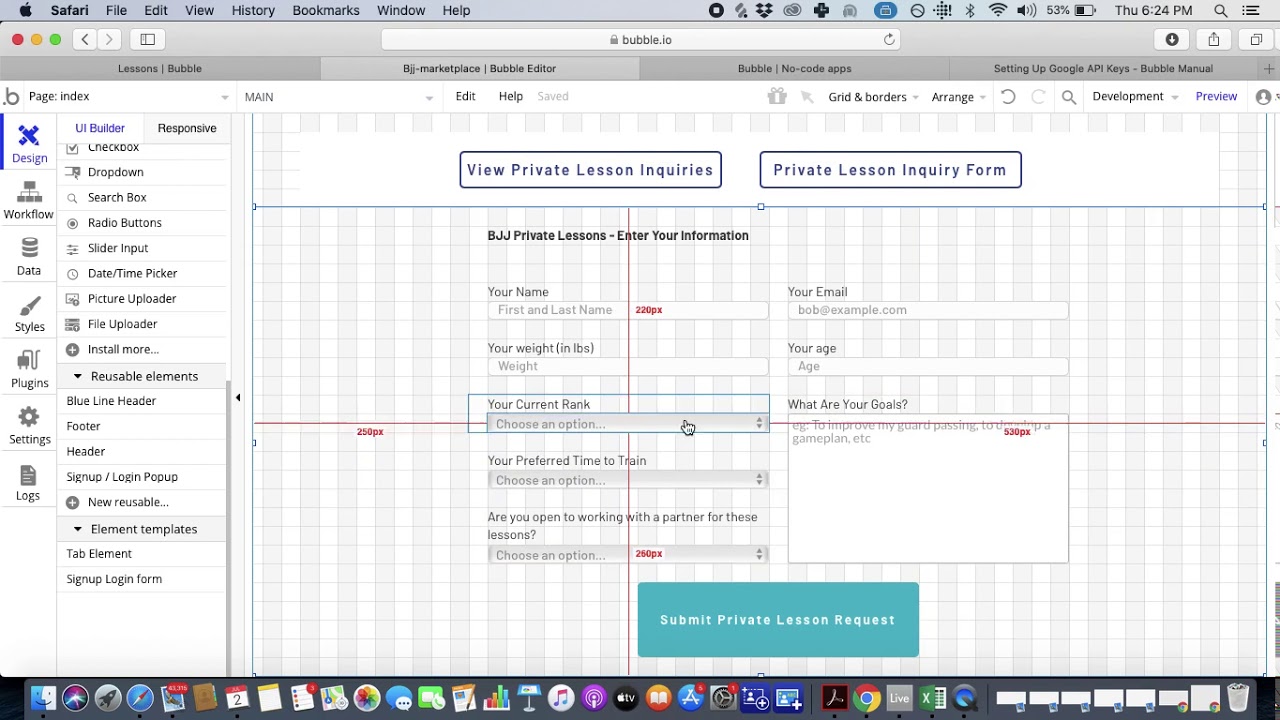
Bubble is a visual web app builder with deep customization capabilities. Its workflow engine handles conditional logic, iterative data processing, and backend events. A plugin ecosystem of 5,300+ options extends functionality across payments, analytics, and integrations. Bubble markets itself as "no-code," but the learning curve tells a different story for non-technical founders.
The learning curve reality: Bubble is powerful, but it is not simple. Building anything beyond basic layouts requires understanding database relationships, API workflows, conditional visibility rules, and Bubble's proprietary logic system. The platform's own forum and community regularly advise new users to expect weeks of learning before becoming productive. Independent users report that most serious Bubble apps are built by hired consultants, not by the founders themselves.
The mobile gap: Bubble does not build native mobile apps. Teams who want their Bubble app in the Apple App Store or Google Play typically use Natively ($49/mo+) to create a WebView wrapper. This adds another service to manage, another subscription to pay, and delivers web-level performance inside a native shell — not a true native experience.
Pricing: Starter at $69/month (billed annually) with 250K Workload Units per month. Workload Unit overages cost $0.30 per 1K WU. Independent users report 400-500 WU per user per day, making costs unpredictable at scale. Most teams hire consultants at $40-$125/hour on top of the platform subscription. Bubble holds a 1.7/5 on Trustpilot across 123 reviews.
Strengths:
- Sophisticated backend logic and conditional workflows
- Large plugin ecosystem (5,300+ options)
- Strong for complex web applications with intricate data relationships
- Active marketplace for templates and plugins
Honest limitations: For a non-technical founder, Bubble's learning curve is steep enough that you will likely need to hire help anyway — which undermines the core reason for choosing a no-code builder. The web-only output means no native mobile apps without additional services and costs. Usage-based pricing (Workload Units) makes monthly costs unpredictable, which is particularly problematic for bootstrapped founders.
Best for: Founders who are building a web-only application with complex business logic and are willing to invest significant time learning the platform — or who have the budget to hire a Bubble consultant.
See the full Adalo vs Bubble comparison
Glide — Spreadsheet-to-App for Internal Tools
Price: $25/mo+; custom domains at $60/mo | Output: Web apps and PWAs only
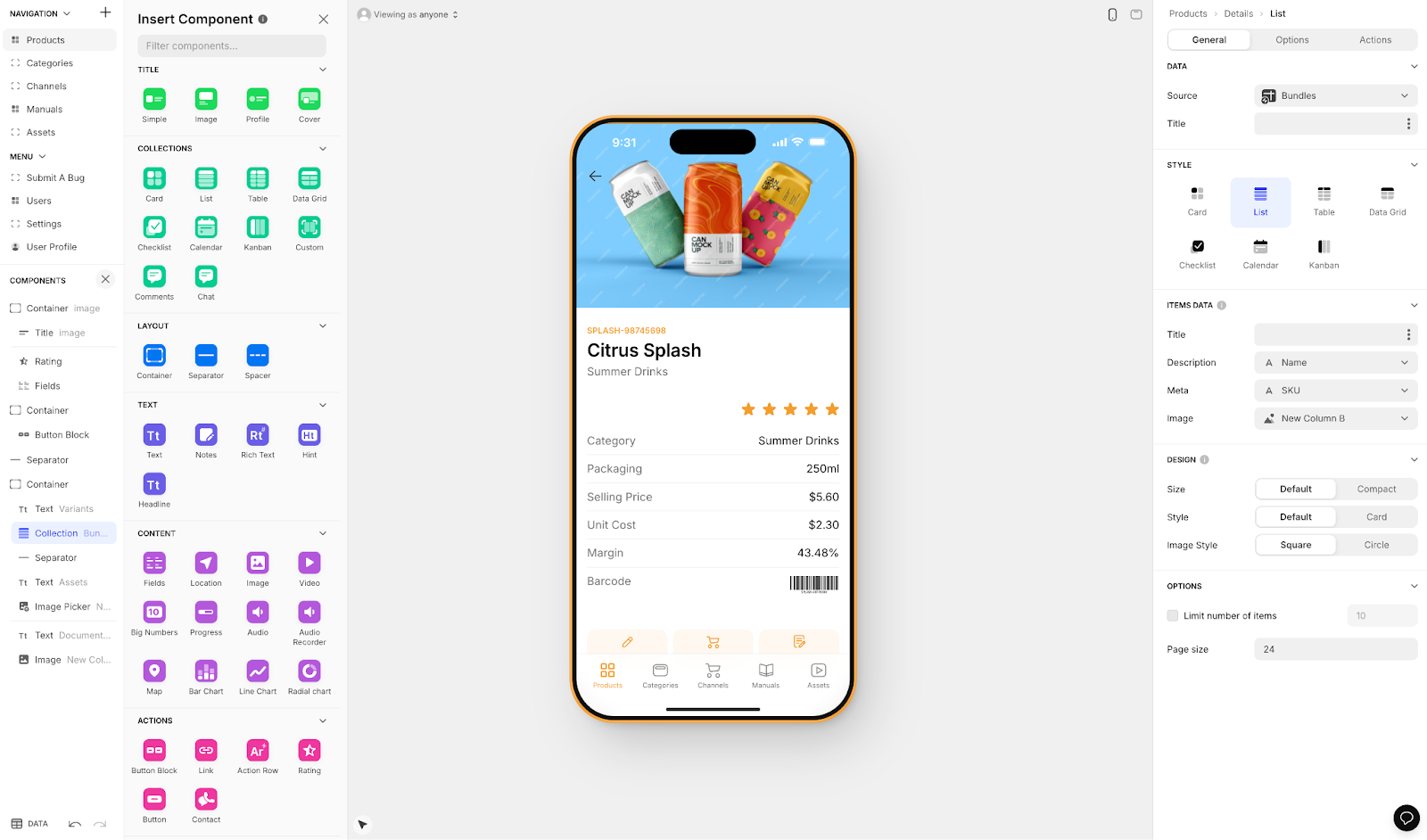
Glide turns Google Sheets and Excel data into functional web applications. If you already have business data in a spreadsheet, Glide can transform it into a searchable, filterable app with user authentication and basic workflows — often within an hour. The interface is built around a familiar spreadsheet paradigm that most people already understand.
What makes it stand out for non-technical founders: Glide has arguably the shortest path from "I have data" to "I have a working app." If your starting point is a spreadsheet of inventory, contacts, properties, or orders, Glide can have a functional interface running in under an hour. The learning curve is minimal because the data model is your spreadsheet — you already understand it.
The limitations for founders: Glide builds web apps and progressive web apps (PWAs) only. There is no native iOS or Android compilation, no Apple App Store publishing, and no Google Play publishing. Your app runs in a browser. For internal tools and simple customer-facing portals, this may be enough. For a product you want customers to download from an app store, Glide is not the right tool. Glide AI adds column-based intelligence (classification, sentiment analysis, text generation) but does not generate complete apps from descriptions.
Pricing: Free plan with limited rows and features. Maker plan at $25/month for basic apps. Custom domains and branding removal require the $60/month plan. Row limits apply on all tiers, and costs scale with data volume.
Strengths:
- Fastest path from spreadsheet data to working app
- Minimal learning curve for spreadsheet-literate users
- Good for internal tools, directories, and simple dashboards
- Google Sheets and Excel integration is intuitive
Honest limitations: Web and PWA only — no native mobile apps, no app store publishing. The spreadsheet-based architecture limits what you can build: complex multi-screen apps with deep relational data, user-generated content, and real-time features are outside Glide's sweet spot. Customization options are more limited than canvas-based or code-based builders. Not suited for customer-facing products that need an app store presence.
Best for: Non-technical founders who need a simple internal tool or data-driven web app built on existing spreadsheet data, and who do not need native mobile apps or app store publishing.
Lovable — Prompt-Led Web Builder (Developer Required)
Price: $20/mo+ (message-based credits) | Output: Web applications only (React + Supabase code) | ABG Score: 5.08/10 (prompt-to-app tier, 290+ sources, zero sponsorships)
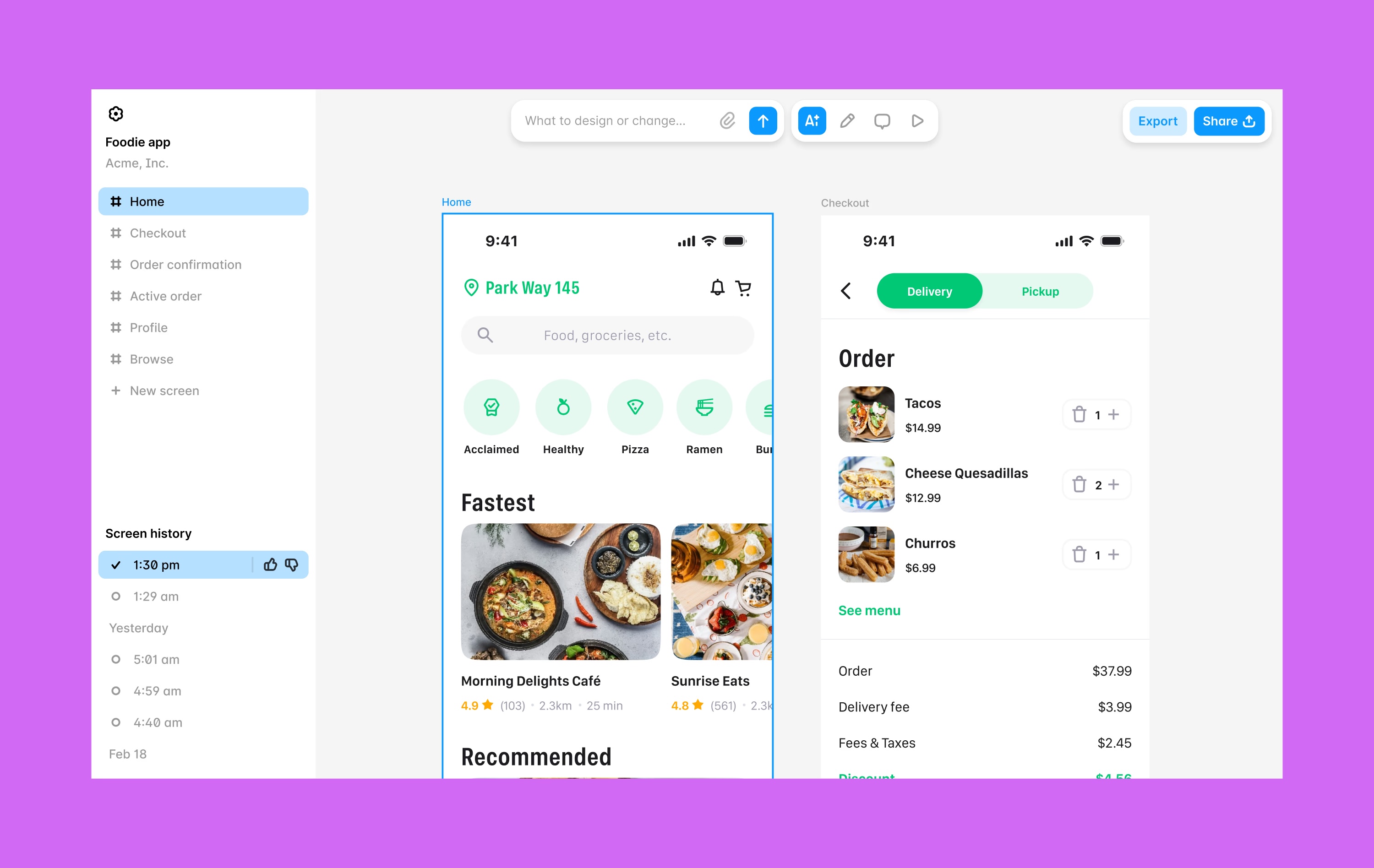
Lovable is a prompt-led web app builder that generates full-stack web applications from natural language descriptions. Type what you want, and Lovable produces a React frontend with a Supabase backend. The results can be impressive for a first version — Lovable generates real, working code that you can deploy and share. It is one of the fastest paths from idea to working web prototype available today.
The critical distinction for non-technical founders: Lovable generates code. Real code — React components, Supabase queries, API routes. This is an important distinction because once the AI generates your app, you are responsible for maintaining that code. When something breaks, when you need to add a feature the AI cannot handle, or when a dependency needs updating, you either need to understand the code yourself or hire someone who does. Lovable is not a no-code platform. It is a code-generation tool with a natural language interface.
The web-only limitation: Lovable generates web applications only. There is no native iOS or Android output. There is no Apple App Store or Google Play publishing. To get a Lovable app onto mobile devices, you would need to wrap it in a WebView container using a service like Capacitor — which adds technical complexity, a separate deployment pipeline, and web-level performance on mobile.
Pricing: Starter at $20/month with limited message credits. Higher tiers at $50/month and $100/month provide more generation credits. Complex apps consume credits faster, and heavy iteration on a single project can exhaust a month's allocation in a few days.
Strengths:
- Very fast from idea to working web prototype
- Generates real, deployable code (React + Supabase)
- Natural language interface feels accessible initially
- Code export means you own the output
Honest limitations: This is fundamentally a developer tool with a friendly interface. The moment something goes wrong with the generated code — and something always does — you need developer skills or a developer on call. No visual editing canvas: all interaction is through a chat interface with a preview pane. No native mobile apps. No built-in database (relies on Supabase). For non-technical founders, Lovable can create the illusion of self-sufficiency during the prototyping phase that evaporates when you need to maintain the app in production.
Best for: Founders who have access to a developer (co-founder, contractor, or freelancer) and want to accelerate the web prototyping phase — not founders who need to build and maintain an app entirely on their own.
Comparison Table
| Platform | Price | Native Mobile | AI Approach | Database | True Zero-Code? |
|---|---|---|---|---|---|
| Adalo | $36/mo flat | iOS + Android (native) | Ada (Magic Start, Magic Add, X-Ray, Visual AI Direction) | Built-in Postgres, unlimited | Yes |
| Appy Pie | ~$18/app/mo | Template-based | AI-assisted setup | Basic built-in | Yes (template-bound) |
| Bubble | $69/mo+ | No (wrapper required) | Bubble AI (chat-based) | Built-in (usage-capped) | Technically, but steep curve |
| Glide | $25/mo+ | No (web/PWA only) | Glide AI (column-based) | Sheets-based | Yes (limited scope) |
| Lovable | $20/mo+ | No (web only) | Prompt-to-code generation | No (requires Supabase) | No (generates code to maintain) |
Total Cost of Ownership: What You Actually Pay in Year One
Platform subscription fees are only part of the picture. For non-technical founders, the hidden costs often dwarf the sticker price: consultant fees, external services, and the time spent learning a complex platform all count. Here is what each platform actually costs in the first year, assuming annual billing where available.
| Cost Component | Adalo | Appy Pie | Bubble | Glide | Lovable |
|---|---|---|---|---|---|
| Platform (annual) | $432 | ~$216 (Android) / ~$720 (both) | $828+ | $300+ | $240+ |
| External database | $0 (built-in) | $0 (basic) | $0 (built-in) | $0 (Sheets) | $0-300+ (Supabase) |
| Mobile wrapper service | $0 (native built-in) | $0 | $588+ (Natively) | N/A (web only) | N/A (web only) |
| Developer/consultant fees | $0 (self-service) | $0 (template) | $2,000-10,000+ | $0 (self-service) | $2,000-8,000+ |
| Usage overages | $0 (no caps) | Varies | Unpredictable (WU) | Row-limited | Credit-limited |
| Year 1 Total | $432 | ~$216-720 | $3,400+ | $300+ | $2,240+ |
Hidden costs to watch for:
- Bubble's consultant fees: Most non-technical founders cannot build production Bubble apps alone. Community surveys consistently show that serious Bubble projects involve paid consultants at $40-$125/hour. Even 40 hours of consultant time at the low end adds $1,600 to your first year.
- Lovable's developer dependency: The generated code works until it does not. When you hit a bug, need a feature the AI cannot generate, or need to update dependencies, you need a developer. Freelance React developers charge $50-$150/hour.
- Bubble's Workload Units: Independent users report 400-500 WU per user per day. A moderately active app with 1,000 monthly users can add $1,000+/month on top of the base subscription.
- Per-app pricing: Appy Pie charges per app. If you build a second app, you pay double. Adalo's flat rate covers unlimited apps.
Frequently Asked Questions
What is the best AI app builder for a non-technical founder with no coding experience?
The answer depends on what you are building and where it needs to run. For a native mobile app published to the Apple App Store and Google Play, Adalo lets non-technical founders go from idea to published app without writing code — AI-powered generation on a visual multi-screen canvas, built-in database, and direct app store publishing at $36/month flat. For a simple web tool built on spreadsheet data, Glide is the fastest option. For a web-only prototype where you have developer access, Lovable generates working code quickly.
Can I really build a production app without coding?
Yes, with the right platform. Adalo and Appy Pie are genuinely zero-code from building through publishing. Glide is zero-code for web apps within its scope. Bubble is technically no-code but has a learning curve steep enough that most non-technical users hire consultants. Lovable generates code you then maintain, so it is not truly no-code despite the natural language interface. The key question is not "can I avoid writing code?" but "can I avoid needing technical help at any point?"
How much should a non-technical founder budget for an AI app builder?
For native iOS and Android apps with unlimited usage, Adalo costs $432/year ($36/month). For simple Android-only apps, Appy Pie starts at ~$216/year. Factor in the full cost: Bubble users typically spend $3,000-$10,000+ in year one when consultant fees and Workload Unit overages are included. Lovable users need a developer budget for maintenance. For comparison, hiring a development agency to build a custom app typically costs $25,000-$100,000+.
Do I need native mobile apps, or is a web app enough?
It depends on your users. If your customers will use your product daily and expect it in the Apple App Store or Google Play, native mobile matters: faster performance, push notifications, offline capability, and the credibility of an app store listing. If your product is primarily used at a desk (internal tools, dashboards, admin panels), a web app may be sufficient. Glide and Lovable build web apps only. Adalo and Appy Pie support native mobile. Bubble requires a wrapper for mobile, with web-level performance.
What about prompt-led builders like Lovable, Bolt, v0, or Base44?
Lovable, Bolt, v0, and Base44 generate web applications from text prompts. They produce React, Next.js, or similar web code that you then deploy and maintain. None of them build native mobile apps. None include a visual editing canvas — interaction is through a chat interface with a preview pane. They are powerful tools for developers who want to move faster, but they are not no-code platforms. For non-technical founders, the initial experience feels accessible, but the ongoing maintenance requires developer skills.
Which platform has the lowest learning curve?
For template-fitting use cases, Appy Pie is simplest — you are essentially filling in a form. For spreadsheet-based apps, Glide is intuitive if you understand spreadsheets. For building custom apps with full control, Adalo's visual canvas and AI builder offer the most approachable experience: see every screen, point at elements, and tell the AI what to change. Bubble has the steepest learning curve in this comparison — plan for weeks of learning or budget for a consultant.
What if I outgrow my app builder?
This is worth thinking about before you start. Lovable exports full React + Supabase code — you can hand it to a development team and continue from there. Adalo offers code export on the enterprise plan within Adalo Blue. Bubble and Glide do not offer code export, so migrating away means rebuilding. That said, most no-code apps do not need to be rewritten — Adalo 3.0 scales to 1M+ monthly active users, which covers the vast majority of use cases.
Is it worth using an AI app builder vs hiring a developer?
For non-technical founders building their first product, AI app builders offer dramatic advantages: $36/month vs $25,000-$100,000+ for custom development, days to weeks vs months to launch, and self-service updates vs ongoing developer dependency. The trade-off is customization — a developer can build anything, while platforms work within their frameworks. For the majority of database-driven apps (marketplaces, booking systems, CRMs, directories), the platform capabilities are more than sufficient.
What does the Replit and Vibecode removal from the App Store mean for non-technical founders?
Apple removed Replit and Vibecode from the iOS App Store in March 2026 under Guideline 2.5.2, which prohibits apps that execute arbitrary downloaded code. For non-technical founders, the practical takeaway is simple: choose a platform that compiles native binaries through a standard, reproducible build pipeline rather than executing code on-device or generating web apps wrapped in native containers. Adalo compiles IPA and APK files on its own infrastructure using Codemagic, the same build pipeline used by professional iOS and Android studios. That architecture has no exposure to App Store policy restrictions of this type. WebView wrappers (like those used to get Bubble apps into the App Store) continue to face Apple's guideline 4.2 scrutiny — another argument for native compilation over the wrapper approach.
Updated April 2026. Pricing verified as of publication date. All platforms listed offer free tiers or trials — test them with your specific use case before committing to a paid plan.

Build your app fast with one of our pre-made app templates
Begin Building with no code